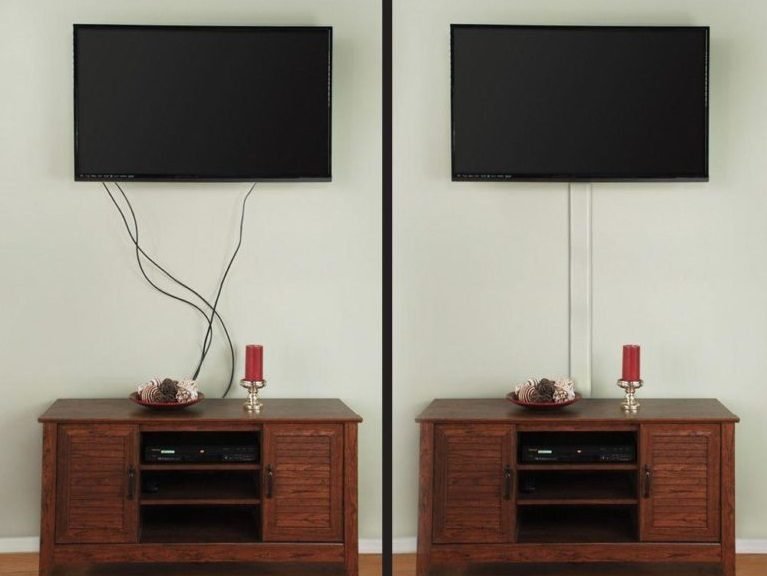
Our wall-mounted TV looked fantastic until you noticed the six cables dangling beneath it like electronic entrails: power, HDMI, soundbar, streaming stick, game console, and one mystery cable I was afraid to unplug. The TV was a design statement; the cables were a cry for help.
How to hide ugly cords behind your TV ranges from a $15 cover to opening the wall. Here are all the options, honestly ranked.
How Can I Hide Ugly Cords Behind My TV?
The quick win is a cord raceway: a paintable plastic channel that mounts to the wall and routes cables from the TV to the outlet. Fifteen dollars, thirty minutes, dramatic improvement. Paint it the wall color and it nearly vanishes. This is the 80% solution for most people, and there is no shame in stopping here; the difference between dangling cables and a neat raceway is the difference between chaos and intention.
The cleanest solution is in-wall routing. How can I hide ugly cords behind your TV completely invisibly? With an in-wall cable management kit ($40-$70): two grommet plates, one behind the TV and one near the outlet, connected by a flexible tube fished through the wall. Power cables cannot legally run inside walls without proper in-wall rated cable, so these kits include a power bridge or you use a recessed outlet. It is a one-hour project with a drywall saw and delivers the floating, wireless look. Check for studs and fire blocks before cutting; a $20 inspection camera saves drywall surgery.
- Cord raceway: $15, 30 min. Paintable channel. The 80% solution, zero wall damage.
- In-wall kit: $50, 1 hour. Grommets + tube fished through wall. The invisible look.
- Recessed outlet behind TV: $100-$150 electrician. Power where you need it. No extension cords.
- Cable box / basket: $20. Corrals the power strip and bricks behind the console.
- Velcro ties, not zip ties: $8. Bundle cables neatly. Velcro allows future changes; zip ties punish them.
- Short cables in right lengths: $30. Excess cable is the enemy. Buy the length you need, not the length that was on sale.
- Route through furniture: free. Drill a grommet hole in the console back. Cables disappear into the cabinet.
- Label everything: $5. Label maker or tape. Future you, troubleshooting at midnight, says thanks.
The supporting discipline is cable minimalism. Every device adds cables, so audit ruthlessly: does the streaming stick duplicate the smart TV’s apps? Can the game console go wireless for controllers? A single high-quality HDMI cable per device, power consolidated into one surge protector inside a cable management box, and Velcro ties bundling the runs. Fewer cables hide better than hidden cables.
Power Safety: The Rules That Matter
Two safety rules are non-negotiable. First, standard power cords and extension cords cannot run inside walls; they are not rated for it and it violates electrical code. Use an in-wall power bridge kit or have an electrician install a recessed outlet. Second, do not overload: a single surge protector with everything plugged in is fine if it is quality and not daisy-chained, but a $5 power strip from a drawer is not the place to consolidate a home theater. Spend $25 on a real surge protector with a high joule rating.
Also, leave service loops: a little slack at each end of in-wall runs lets you pull devices forward for changes without fishing cables again. The invisible setup should still be serviceable, or the first upgrade becomes drywall repair.
Quick Answers to Common Questions
Can I run HDMI cables inside the wall?
Yes, HDMI and other low-voltage cables (ethernet, optical audio) can run in-wall freely. Only standard power cords are restricted; they need in-wall rated cable or a power bridge kit.
How much does it cost to hide TV cords?
$15 for a raceway, $50-$70 for an in-wall kit DIY, $100-$200 for an electrician-installed recessed outlet. All dramatically cheaper than the visual chaos costs you daily.
Do I need an electrician to hide TV wires?
For low-voltage cables and raceways, no. For new outlets or in-wall power, yes, or use a code-compliant power bridge kit designed for DIY.
What is the easiest way to hide TV cords in a rental?
Paintable cord raceways with adhesive backing: no holes, removable, and nearly invisible when painted. Cable boxes behind the console handle the rest.
My Cord-Hiding Checklist
- Audit and minimize devices. Fewer cables hide better than hidden cables.
- Raceway for renters, in-wall kit for owners. $15 vs $60. Both transform the wall.
- Power stays code-compliant. Bridge kit or recessed outlet. Never extension cords in walls.
- Velcro ties + right-length cables. Neat bundles, no excess spaghetti.
- Label everything. Midnight troubleshooting will thank you.
What I Would Do Next
Our TV wall is now just the TV, floating clean against the paint, and I notice the absence of cables every single day. The in-wall kit took 45 minutes, most of it spent being nervous about cutting drywall. Total cost $60. It is the cheapest interior design upgrade I have made, measured in daily satisfaction per dollar.
How to hide ugly cords behind your TV: raceway for the quick win, in-wall kit for the invisible look, cable box for the console chaos, and Velcro discipline throughout. $15 to $60 solves it.
The TV was the easy part. The cables were the project. Finish it this weekend.
For the ultimate clean look, consider relocating devices entirely: a small network closet or ventilated cabinet in an adjacent room can house the streaming devices, game consoles, and network gear, with a single HDMI and IR repeater connecting to the TV. It is more project than most people need, but for dedicated media rooms it eliminates every visible component, leaving just the screen on the wall.
Related reading: How Much Does It Cost to Refinish Hardwood Floors.
Related reading: How Can I Improve My Home’s Curb Appeal Cheaply.
Related reading: How Can I Add Storage to a Small Laundry Room.
For official guidance, check out EPA guidance on indoor air quality and the Department of Energy home efficiency guides.