
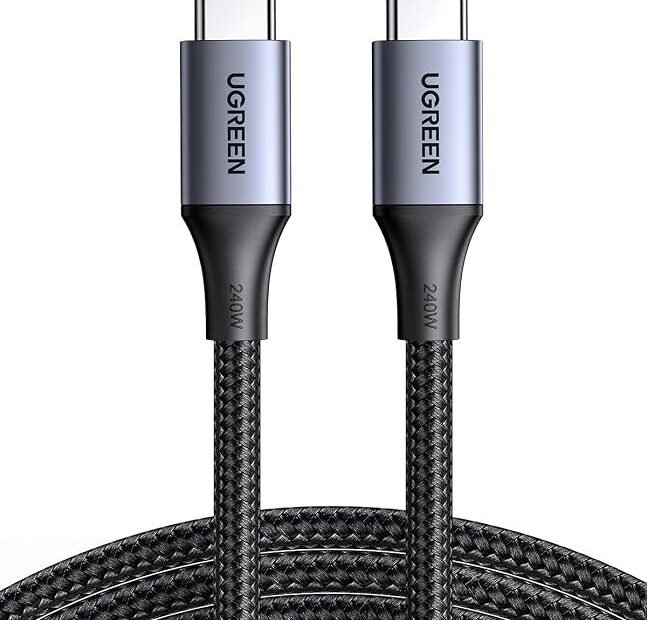
Two cables sit in your kitchen drawer. They look the same — same plugs, same color, roughly the same thickness. One charges your phone in about an hour. The other needs most of the afternoon. There is no visible difference, and that is exactly the problem: a USB cable’s charging speed is written in its specs and its behavior, not on its face.
The good news is you do not have to guess. There are five quick tests, from free to nearly free, that will tell you what any cable can really do. Work through them in order and you will know within a few minutes.
What you need before you start
Gather three things: the cable you want to test, the charging brick you normally use, and your phone with its battery somewhere below half. That last part matters more than people expect. Phones charge fastest when the battery is low and deliberately slow down as it fills, so a test that starts at 85 percent tells you nothing about the cable.
Also know your chain has three links — the brick, the cable, and the phone — and the slowest one sets the speed. A mighty brick and a fast phone still charge slowly through a weak cable, which is why the cable deserves its own test instead of being blamed last.
Test 1: Read what is printed on the cable
Start with the simplest check. Many cables have tiny text printed along the jacket or stamped on the connector housing. On USB-C cables, look for a wattage rating. Cables are commonly rated at 60 watts, 100 watts, or higher, and a cable only delivers fast charging if its rating is at least as high as what your phone and brick are trying to push through it.
You may also see a small “SS” logo or a number like 10 or 20 near the connector. Those describe data speed, not charging power, so do not let them impress you — a cable can be quick at moving files and lazy at moving power. And if the cable has no markings at all and came free in a box of other things, treat that silence as information. Reputable makers print their ratings. Mystery cables stay mysterious for a reason.
Test 2: Match the cable against the brick and the phone
Now check the other two links so the cable gets a fair trial. Read the small print on your charging brick: it lists its output in watts or in volts and amps. Then recall what your phone accepts — most modern phones fast-charge somewhere between 20 and 45 watts, with some models going well beyond that.
The logic is simple. If the brick puts out 25 watts and the phone can take 25 watts, the cable needs to be rated for at least 25 watts to keep up. A basic 15-watt-era cable in that chain becomes the bottleneck, and no setting on the phone will fix it. This is also why the cable that came in the phone’s box is worth keeping track of: it was chosen to match the phone, while the tangle of spares in the drawer came from everywhere.
Test 3: Watch what the phone tells you
Plug in with the battery below half and look at the screen. Many Android phones say it outright — “Charging rapidly” on the lock screen means fast charging is working, while a plain “Charging” or a message quoting hours remaining means it is not. Some phones go further and show the wattage or a double lightning-bolt icon. Learn what your model shows once, and every future cable test takes five seconds.
iPhones are quieter about it — there is no on-screen speed label. But the behavior still gives the answer, which brings us to the test that never lies.
Test 4: Time the charge from low to halfway
Numbers end arguments. Let the phone run down to about 10 or 20 percent, plug it in with the cable under test, note the time and the percentage, and leave it alone for 30 minutes. On a proper fast-charging setup, an iPhone should reach roughly 50 percent in about half an hour, and most Android phones land in a similar place. That 0-to-50 window is where fast charging does its best work, and Apple describes the same half-hour benchmark in its own guidance on how to fast charge an iPhone.
If 30 minutes only bought you 15 or 20 percent, something in the chain is slow. Swap in a cable you trust — ideally the one that came with the phone — and repeat the test the next day at a similar battery level. If the speed jumps, you have found your culprit: the first cable does not support proper fast charging, whatever its packaging once claimed.
One warning about this test: do not run it starting from 80 percent. Phones throttle charging hard near the top to protect the battery, so even the best cable looks slow up there. That slowdown is the phone being careful, not the cable being weak.
The plug shape tells you almost nothing
A word about the two connector families, because this confuses everyone. USB-A — the old rectangular plug — and USB-C — the small oval one — describe the shape of the hole, not the speed of the charge. Some USB-C cables are excellent; some are the slowest cables in the house. Plenty of USB-A cables were built for the fast-charging standards of their era and still do that job well. Never judge by shape, and never assume a cable is fast because it is new or slow because it is old. The rating and the timing test outrank every assumption.
Length matters a little, too. Very long, thin cables lose more power along the way than short ones, which is why the three-meter bargain cable by the sofa often charges a touch slower than the short cable by the bed. It is rarely the whole story, but if two cables are otherwise equal, the shorter, thicker one usually wins.
The free cables that came with other gadgets
Every house accumulates cables that arrived as packing material — the lead bundled with a desk lamp, a fan, a toy, a pair of earbuds. Understand what those are: many of them are charge-only cables built to the cheapest specification, intended to trickle power into a device that sips it. Some carry no data at all. Pressed into service on a modern phone, they charge at the pace of a different decade, and they are the most common villains in the “my phone charges slowly at home but fast in the car” mystery.
The tidy-up that ends this category of problem takes ten minutes. Test the household’s cables once, with the timing test below, and mark the results physically — a small piece of tape or a dot of nail polish on the good ones. Fast cables live at charging spots. Slow cables go in a labeled bag for lamps and speakers, or leave the house entirely. Future you, at 11 p.m. with 4 percent battery, will be grateful.
Test 5: Rule out the boring causes
Before you bin a cable, check the two dull things that fake a bad cable. First, the connector and the phone’s port. Pocket lint packs into charging ports over months, and a connector that cannot seat fully will charge slowly or keep dropping the connection. A wooden toothpick and a gentle hand fix more “dead cables” than any purchase.
Second, heat. A phone that gets hot — from a thick case, a sunny windowsill, or gaming while charging — slows its own charging to protect the battery. Test on a cool table, case off if yours is chunky, screen off, and give the cable a fair chance before judging it.
When it is time to just replace it
If a cable fails the timing test with a clean port and a cool phone, believe the result. Retire it to a low-stakes job — charging a lamp or a speaker — and buy one certified replacement. The price gap is small and the difference is not: a certified cable from a known brand runs about $12, against roughly $6 for the mystery kind, and the certified one is the difference between fast charging today and a frayed, overheating connector someday.
One last habit separates the tested from the untested over time: cables migrate. The good one by the bed gets borrowed for a trip, a child’s tablet, a car — and a mystery cable takes its place like a cuckoo. The tape dot from the tidy-up only works if the household knows the code, so tell them: dotted cables are the fast ones, and they live where they live. It sounds like a small domestic treaty. It prevents the slow-charge mystery from ever needing a detective again.
Buy one good cable for the place you charge most, label it if you have to, and let the drawer full of lookalikes go. And if your charging worries run deeper than cables — say the battery itself seems to vanish while you sleep — that is a different fault with its own fixes, covered in our guide to why your phone battery drains overnight.



