
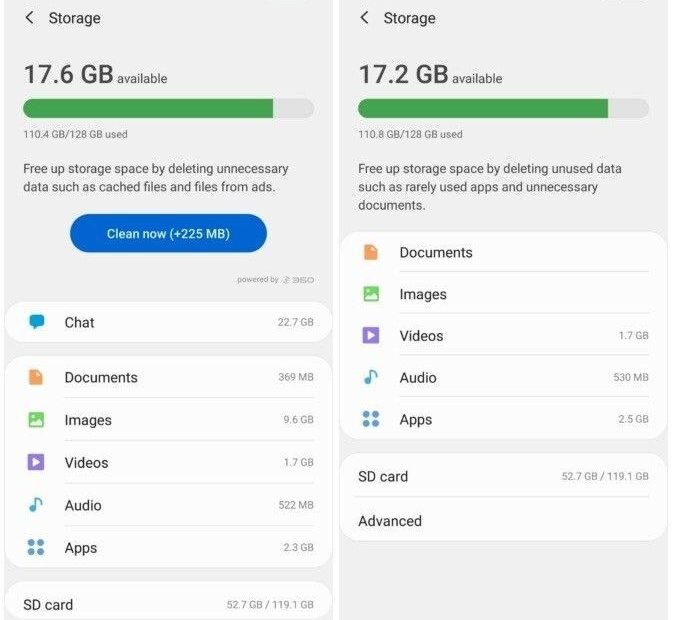
The warning picks its moment with real cruelty: Marcus is in the bleachers, his daughter is walking up for her first solo, he lifts the phone to record — and “Storage almost full” slides down over the camera. Not out of nowhere, of course. The phone had been 96 percent full for a month. It just chose today to mention it. What follows is the fifteen-minute cleanup Marcus does in the car afterward — the same one worth doing in your kitchen before your own bleacher moment — followed step by step, in the order that frees the most space fastest.
Minute One: Read the Map Before Digging
Marcus starts where everyone should: Settings → Storage (on Samsung, Battery and Device Care → Storage). The screen draws the crime scene as a bar chart — apps, photos, videos, “other” — and names the biggest residents. His surprise is the usual one: photos are not the main offender. Two streaming apps and a game he has not opened since spring are sitting on double-digit gigabytes between them, mostly cache. This one screen converts “my phone is full” (vague, expensive-feeling) into a list of three suspects, which is a completely different afternoon. Whatever your phone shows, work its list in size order; storage cleanup obeys the same law as debt — biggest first, feelings later.
Minutes Two to Five: The Photos Trick That Feels Like Cheating
His photos library is backed up to Google Photos — he checks, because this step is vandalism without a backup — and then he taps the button that does more than the rest combined: in Google Photos, under his profile → Photos settings (or the “Free up space” option in the library menu), the app offers to delete the local copies of everything already safely backed up. One tap routinely frees 5 to 20GB, because years of originals have been living twice — once in the cloud, once in his pocket. The photos all still appear in the app exactly as before, streamed or downloaded on demand. If your library lives in a different cloud, the same feature exists under other names. If your library lives nowhere — stop, back it up first, and let today be the day that changed; Marcus’s tap is only safe because a copy exists somewhere the phone is not.
Minutes Five to Nine: The Cache Pigs
Back in the storage list, Marcus opens Apps and sorts by size, and here live the pigs. Social and streaming apps are notorious cache hoarders — TikTok and Spotify holding 5GB or more each is something support techs see weekly, because every video you half-watched and every song you streamed leaves a souvenir. The fix differs by app temperament. Some apps carry their own “clear cache” or download manager inside their settings — Spotify and TikTok both do — and clearing there keeps your login and library intact. For the rest, Android’s per-app screen (Settings → Apps → the app → Storage → Clear cache) does it safely: cache, never “clear data,” which signs you out and wipes settings. He reclaims six more gigabytes across four apps without losing a single thing he can name.
Minutes Nine to Twelve: The Downloads Drawer
Every phone has a drawer of good intentions: the six films downloaded for a flight in March, the podcast backlog set to keep ten episodes (it kept forty), the offline maps of a city he has left. Downloads are the politest form of clutter because they were always meant to be temporary, and deleting them costs nothing but a future re-download. Marcus clears the films, trims the podcast app to keep two episodes, and deletes the maps. Three more gigabytes, and not one pang of loss — this is the step to teach your family, because it is the one where the phone’s hoarding is revealed to be mostly your own past optimism. Google’s own guide to freeing up space on Android puts the same drawers in the same order, for the same reason.
Minutes Twelve to Fourteen: Messages and the Files App
The last big resident is the chat archive. Years of family group threads — every video, every photo, forwarded and re-forwarded — live inside the messaging apps, invisible to the storage bar’s neat categories. Marcus opens his biggest thread’s storage page inside the app itself and deletes the video pile (the photos are in the cloud backup; the forty identical goodnight videos are not a heritage). Then he opens the Files by Google app and runs its cleaning suggestions — duplicate files, large files, downloaded debris — accepting the safe ones. Two more gigabytes — plus a small one he almost misses, the browser’s download folder, where a year of PDFs and menus had quietly taken rooms of their own. His phone is now under 75 percent full, from 96, and he has not deleted a single thing he remembers owning.
The Second Pass: Defaults That Refill the Phone Behind Your Back
A week after his cleanup, Marcus checks again out of suspicion — and finds a gigabyte has crept back. This is the part of the story nobody warns you about: the cleanup is an event, but the refilling is a system, and the system is defaults. His video app had quietly re-downloaded the next episodes of a series “for his convenience.” His podcast app, set to auto-download every new episode of six shows, had obeyed enthusiastically. His chat app was saving every received video to the gallery and keeping its own copy — the double-entry bookkeeping of phone storage. So the second pass is a settings tour, done once: streaming apps’ auto-download, off or capped at a couple of episodes; chat media auto-save, set to photos only or off; camera set to record 1080p unless 4K is chosen deliberately for a specific moment. Ten toggles, and the phone stops refilling itself in the night. Cleanup without this pass is bailing a boat with the leak open; with it, the fifteen minutes above become an annual event instead of a monthly one.
If the Phone Is Still Full After All This
Sometimes it is — a 64GB phone in 2026 living a full modern life is genuinely small, and honesty beats another lap around the same menus. The remaining honest moves, in order: offload the video archive to a computer or drive (your own files, under your own roof, not another subscription); move to the cloud for photos if you have not, accepting it as a few dollars of rent for sanity; and — the true last resort — a factory reset with a selective restore, which returns the phone to its showroom weight and lets you reinstall only what you actually use, a weekend project with a strangely satisfying outcome. What not to do is the move the bleachers nearly forced: buying a new phone in a panic at full price because a warning appeared during a solo. Storage pressure is a maintenance fact, not an emergency, and it prices itself very differently on a calm Saturday than in a moment of public embarrassment.
One scene deserves adding because it happens on almost every phone during this cleanup: the mysterious category. Android’s storage screen has an “Other” or “System” wedge that frightens people out of proportion — several gigabytes that no button seems to claim. Nearly all of it is accounted for: app data that is not cache (offline maps, downloaded dictionaries, your music library’s database), system files the phone legitimately needs, and thumbnails and indexes of everything above. It shrinks a little as you clean elsewhere and then stops, because most of it is load-bearing. The lesson is to stop digging at it — the wins in this article are all in the named categories, and the people who go hunting in “Other” with file managers delete something structural and spend their Saturday differently. Marcus leaves his wedge alone, and his phone rewards the restraint by simply working.
Minute Fifteen: The $15 Escape Hatch and the Habits
His phone has a microSD slot — increasingly rare, but many Samsung A-series and Motorola phones still carry one — so a $15 128GB card becomes the permanent photo-and-video annex, and the internal storage stops being the family’s whole warehouse. Whether or not your phone takes a card, the habits matter more from here: auto-download of media in chat apps, off (or Wi-Fi only); podcast and video apps set to keep only the newest couple of episodes; and a two-minute storage check on the first of the month, so the bleachers never get a sequel. The deeper lesson Marcus takes home is that a full phone is rarely a storage problem — it is several small defaults, all set to “keep,” compounding quietly. And if your phone is chronically small no matter how you clean, that is a buying fact for next time, which our guide to how much phone storage you really need turns into a number before you are standing in the aisle guessing.



1 Comment