
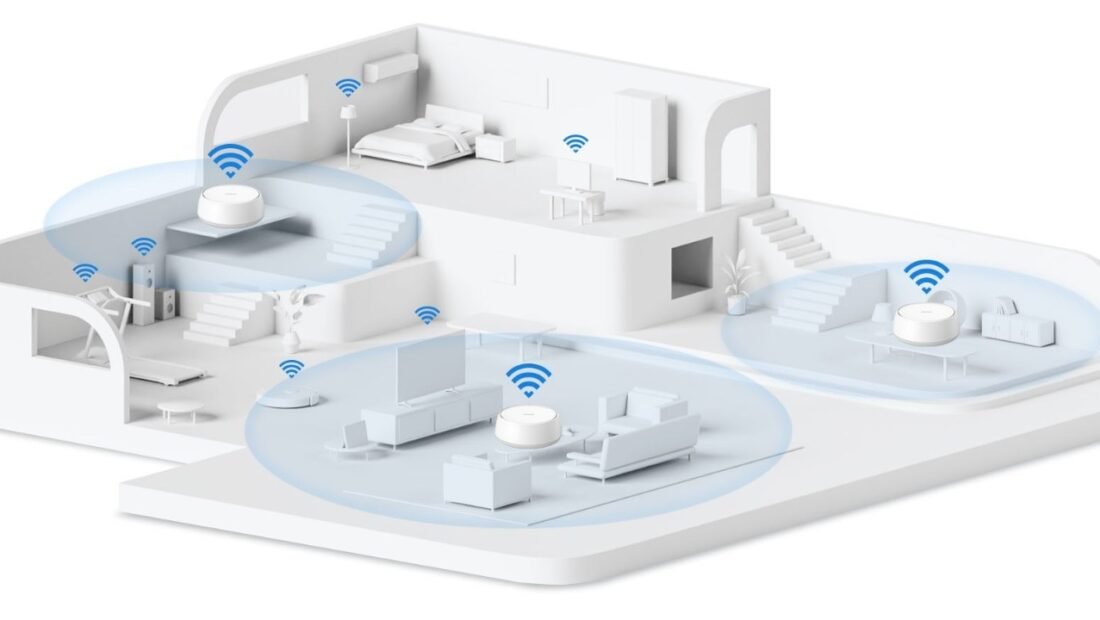
Downstairs, in the room where the router lives, the same internet connection streams a film in 4K without a stutter, every single night of the week. Upstairs, your video call freezes mid-sentence for the fourth time this week, in the room where you actually work. Two-story houses manufacture this frustration with total reliability, and the router aisle offers three different cures at three different prices — a mesh system, a single powerful router, or wired tricks with the cables already in your walls. Each has real strengths and real weaknesses. Here is the honest weighing, and then a verdict.
Why Two Stories Defeat Most Routers
Wi-Fi, it turns out, passes through empty air beautifully and through building materials — wood, plaster, brick, water, and metal — grudgingly at best. A floor is the worst obstacle in a house: wood, subfloor, underlay, sometimes tile or radiant heating, all sitting directly above the router, exactly where the upstairs signal needs to go. The 5GHz band that carries the fast speeds is worse at this than the old 2.4GHz band — it trades range for speed — so upstairs rooms get a signal that is either slow (2.4GHz reaches, but wheezes) or fast and fragile. Before you spend anything, confirm this is your problem and not your internet plan’s: stand next to the router and run a speed test, then run one in the bad room. If the router area gets 200 Mbps and the upstairs gets under 25, you have proven a coverage problem — and coverage problems are fixed with placement and hardware in the house, never by paying the ISP for a faster plan that arrives at a router your bedroom cannot hear.
Option A: A Mesh System — the Default Answer
What it is: two or three matching units — a main router and satellite nodes, one per floor — that form a single network and hand your devices between them as you move. The named systems in this class (Eero 6+, Nest Wifi Pro, TP-Link’s Deco XE75) run $200 to $350 for a two- or three-pack.
Pros: It solves the actual geometry problem — the upstairs node lives upstairs, so the signal travels one short hop through the floor between wired-speed nodes instead of your laptop shouting down the stairs. Setup is app-guided and genuinely simple; coverage is even; roaming between floors is seamless; and guest network and parental controls are built in. For most two-story homes it is simply the finished answer.
Cons: The price stings next to a single router, and each wireless hop costs some speed — a node talking to the main unit over Wi-Fi shares airtime with your devices, so the far corner of the house gets less than the headline speed. Purists also dislike the app-locked settings. Neither con outweighs working Wi-Fi in every room, but they set up Option C.
Option B: One Powerful Single Router
What it is: a high-end standalone router — the TP-Link Archer AX73 or ASUS RT-AX86U class, around $150 to $200 — with big antennas and strong radios.
Pros: Cheaper than mesh, no hops, full manual control, excellent if the router can sit centrally — a small two-story home, or one where the router lives upstairs in the middle, can genuinely be covered by one strong unit. Gamers and tinkerers prefer the control.
Cons: Physics does not care about marketing. A $400 “gaming router” cannot punch through two floors any better than physics allows, and antennas do not fix a floor slab. If your router must live in a corner by the cable entry — most do — a single unit fights the whole house from the worst position. This option wins in compact homes and loses in spread-out ones.
Option C: Wired Backhaul — the Connoisseur’s Fix
What it is: give the upstairs node a wired connection so no speed is lost on the hop. Houses wired with coax cable TV outlets have a hidden superpower: MoCA adapters ($60 to $80 each) turn that coax into gigabit Ethernet between floors. Run a mesh node or a simple access point upstairs on a MoCA-fed wire, and the upstairs gets something close to full speed.
Pros: The performance ceiling disappears — this is how offices do it — and it rescues a mesh system from its one weakness. If Ethernet is already in the walls (newer homes), it costs nothing but a cable.
Cons: It needs the coax or Ethernet to exist in the right rooms, and adapters add $120 to $160 to the project. Without in-wall cabling, you are down to running a flat Ethernet cable along stairs and skirting boards — effective, cheap, and aesthetically negotiable depending on the household.
Placement Rules That Matter More Than Brand
Whichever option you choose, physics grades the placement. Nodes belong out in the open, roughly halfway between the main router and the dead zone — not inside the dead zone itself, a mistake that guarantees the node receives the same miserable signal your laptop did. Keep them off the floor, away from thick masonry, mirrors, and big metal (a refrigerator between node and bedroom is a wall that hums). The Wi-Fi Alliance’s consumer resources and the FCC’s broadband speed guide both land on the same unglamorous truth: most home Wi-Fi misery is placement and coverage, not the number on the internet bill.
Reading Your House: Materials That Eat Wi-Fi
Not all floors are equal, and a five-minute audit of what your signal must cross beats any spec sheet. Plain wood and drywall are mild obstacles. Then the menu darkens: brick and stone internal walls, concrete floors, metal lath in older plaster, foil-backed insulation, radiant floor heating, large mirrors, and — nobody believes this one — big aquariums, because water absorbs Wi-Fi frequencies enthusiastically, which is also why your own body is mostly a Wi-Fi obstacle. A router in a basement under a concrete floor has lost before it transmits a single packet; in that house, plan on a node per level no matter what the box promises, and treat any single-router advice as written for a different building. Conversely, a modern open-plan two-story with wood floors and the router on the landing is the compact case where Option B shines. The house decides. The products just execute.
The Option Missing From This Guide on Purpose: Cheap Extenders
Range extenders deserve their paragraph of warning, because they are the purchase most two-story households have already made and regretted. A basic extender repeats the signal it receives — and if it sits in the weak-signal room, it faithfully repeats weakness at half speed, because a single-radio extender spends half its life listening and half talking. It also typically broadcasts a second network name, so devices cling to the dying main signal instead of roaming, which is how you end up with full bars of useless Wi-Fi. This is precisely the pair of problems mesh was invented to solve — one name, smart handoffs, nodes placed at the halfway point. If an extender already lives in your house, moving it to the halfway spot and giving it the same network name improves it noticeably; but if you are spending new money, spend it on the mesh and skip the repeater generation entirely.
Does the Wi-Fi Generation Matter? (6, 6E, and 7, Honestly)
Briefly, because the marketing will not be: for coverage — this article’s problem — barely. Wi-Fi 6 improved efficiency in crowded homes and is the sensible baseline for a new purchase. Wi-Fi 6E and 7 add the 6GHz band, which is fast and clean but has even shorter range and worse wall penetration than 5GHz; it is a gift between a node and a nearby device, and between nodes in the same open space, and it does almost nothing for the far upstairs bedroom by itself. Where the new bands genuinely help a two-story house is node-to-node backhaul in line-of-sight layouts. Buy the generation for your devices and your budget, but buy the topology — mesh, placement, wired backhaul — for the house. Generations impress; topology delivers.
The Verdict
For the typical two-story house — the one with the router exiled to a corner by the cable entry and a suffering upstairs full of bedrooms and a desk: buy the mesh system, two nodes minimum, three if the house is large or L-shaped — $200 to $350, placed with the halfway rule, and stop thinking about it. If your house has coax in the right rooms, add MoCA backhaul later only if the upstairs speeds still disappoint; for most households plain mesh is enough. Choose the single powerful router only when the home is genuinely compact or the router can truly sit in the middle of it. And if your problem is narrower — one laptop, one room, drops rather than dead zones — diagnose before you shop: our guide to why Wi-Fi keeps disconnecting on a laptop covers the device-side causes that no router purchase will fix.



