
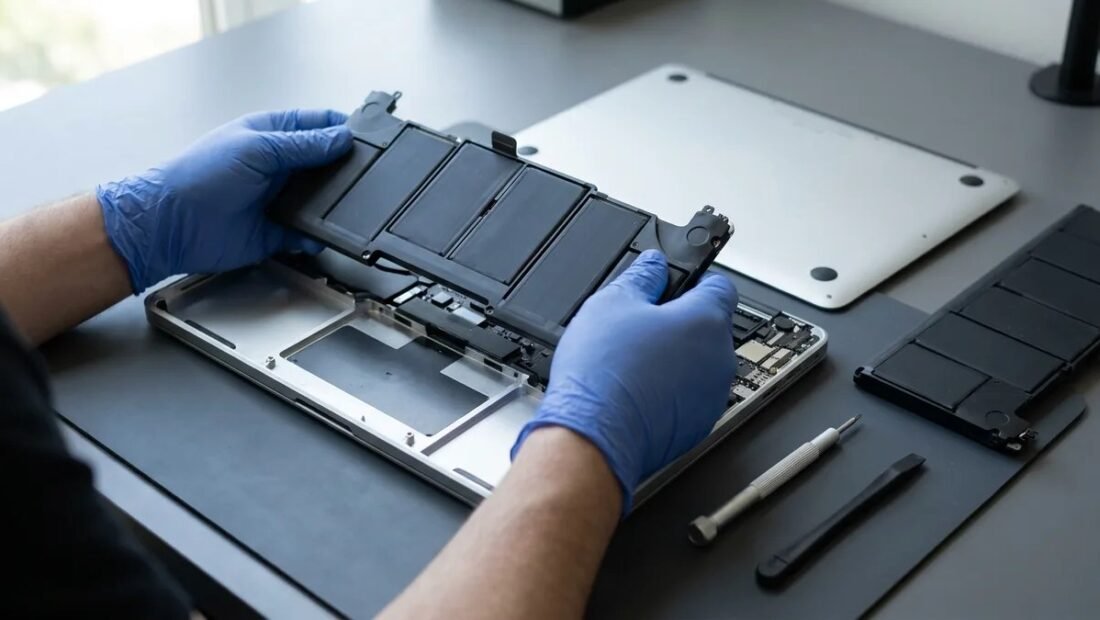
The warning appears exactly when you can least use it: “Service Recommended,” battery health at 78 percent, and a MacBook that now dies before the workday does. Apple’s quote — $249 — lands in the same week as a dozen other bills, and a local shop advertises the same job for $120. Same battery problem, three very different doors (four, if you count doing it yourself). Here is what each one actually gets you, what each one quietly costs, and how the right choice changes with the age of the machine.
First, Confirm the Battery Is Really the Problem
Before pricing anything, verify the diagnosis — five minutes that can save the whole bill. On a MacBook, hold the Option key and click the Apple menu → System Information → Power: the two numbers that matter are cycle count and condition. Most MacBook batteries are rated for about 1,000 cycles before they are considered consumed. Cross-check with System Settings → Battery, where the maximum capacity percentage tells the same story as the phone-style health figure: below 80 percent, the battery is genuinely worn by Apple’s own definition. If your numbers are healthier than that — say 88 percent and 400 cycles — but the MacBook dies early, your problem may be software (a runaway process) rather than the battery, and no replacement at any price fixes it. Rule that out first; the rest of this article assumes the battery really is tired.
Option 1: Apple Itself — $199 to $249
Apple’s pricing is the simplest in the industry: $199 for MacBook Air models, $249 for MacBook Pro models, covering the battery, Apple’s labor, and a 90-day service warranty. (On some models the battery is serviced as part of the top case, which is why the price holds steady across so many machines.) You get a genuine Apple battery, calibrated by the people who built the machine, and — underrated — no argument later about whether a third-party part voids some other repair. Apple’s battery service and recycling page carries the official terms and the route to book it, by mail or in store.
The special case that beats everything in this article: AppleCare+. If your MacBook is covered, battery replacement is free when health drops below 80 percent — no $199, no decision. Check your coverage status before reading another word of comparison, because a remarkable number of people pay third-party shops for a repair Apple owed them for nothing.
Option 2: A Good Independent Shop — $100 to $150
Reputable independent shops typically charge $100 to $150 all-in — less because their labor is cheaper, but mainly because aftermarket batteries cost them $40 to $70 instead of Apple’s part pricing. Turnaround is the other win: usually one to two hours, against days for a mailed-in Apple repair. The trade-offs are real but manageable. Battery quality varies by supplier, so the shop’s own warranty (ask for at least a year, in writing) is the thing you are actually buying. And know the institutional catch: Apple may decline future service on a machine with third-party parts inside, which matters if the MacBook is new enough that you would ever take it back to Apple. Choose the shop by reputation and warranty, not by the lowest number on the sign — a $90 battery job with a 30-day warranty is a worse product than a $140 job warranted for a year.
Option 3: Do It Yourself — $80 to $120, With a Warning
DIY kits exist — iFixit sells them for $80 to $120 with the tools and genuinely excellent guides — and on older, screw-together MacBooks the job is an honest hour of careful work. On modern models it is a different proposition: the battery is glued in, in strips, and the removal technique involves prying and solvent next to a lithium cell that becomes a genuine fire risk if punctured. This is not a ritual warning. A glued battery replacement is the one repair where experienced technicians speak about beginners the way electricians speak about enthusiasts. If your MacBook is a recent glued model, the $50 to $100 you would save over a professional shop is buying risk out of proportion to the saving. If it is an older removable or screwed-in battery, DIY is legitimate — read the full guide twice before the first screw turns.
Option 4: Don’t Replace It (Yet)
There is a respectable fourth door: live with it, deliberately. A MacBook that holds 70 percent health still works perfectly as a mostly-plugged-in desk machine, and plenty of home MacBooks never leave one room. Turn on Optimized Battery Charging (System Settings → Battery → Battery Health) so the machine stops sitting at a stressful 100 percent on the charger, accept the shorter unplugged life, and bank the $200 toward the eventual replacement computer. This stops being respectable when the battery swells — a trackpad that clicks strangely, a lid that no longer closes flat, a bottom case bulging — because a swollen battery is a safety issue, not a budget issue, and it skips the queue to Option 1 or 2 immediately.
What the Health Percentage Does Not Tell You
The single percentage invites single-number thinking, and batteries are subtler than that. Two batteries at 82 percent can behave differently: one delivers a shorter but honest day, while the other looks fine on the gauge and then collapses at 30 percent or throttles the processor when a demanding app opens, because it can no longer supply peak power even though its stored charge is respectable. MacBooks report some of this — a battery that can no longer support peak performance may trigger a service message well above the 80 percent line — which is why the felt symptoms (sudden shutdowns, slowdowns under load, a trackpad lifted by swelling) outrank the number when they appear. Judge the battery the way you would judge a car tire: the tread gauge matters, but the bulge in the sidewall ends the discussion.
Vetting the Independent Shop: Three Questions
If you go the independent route, the shop matters more than the price, and three questions sort the professionals from the gamblers in under a minute. First: “What brand of battery do you fit, and what warranty comes with it — in writing?” A good shop names its supplier and offers a year; a vague shop says “high quality” and offers a month. Second: “Will the battery health percentage read correctly afterward?” On some models, an aftermarket battery that lacks the right electronics reports nonsense or nothing in System Settings — the machine works, but you lose the very gauge this article started with; professionals know which of their batteries avoid that and will say so. Third: “If the health drops below 80 percent inside the warranty, what happens?” The answer should be a free replacement, not a shrug. Ask the three, and the $100-to-$150 range stops being a lottery and becomes what it should be: the same repair, minus the logo, at an honest discount.
How Long Each Door Keeps You Without the Machine
Time is the hidden column in the price table. An Apple Store repair, with the part in stock, is often same-day or next-day; mail-in service runs several business days each way plus repair time, which turns a $249 repair into most of a working week without the laptop — budget for that if the machine is your livelihood, or choose based on Apple’s store availability rather than the headline price. The independent shop’s one-to-two-hour turnaround is its loudest advantage and the reason so many freelancers default to it: the battery is changed between breakfast and lunch meetings. DIY costs an evening and the discipline not to rush the adhesive strips. And the fourth door — living with it — costs nothing and no time at all, which is exactly why it deserves its place on the list for desk-bound machines.
The Recommendation, by Machine
Pull the threads together and the decision sorts itself by age. Covered by AppleCare+: Apple, free, no debate. Under about four years old and otherwise fast: replace the battery without hesitation — Apple’s $199–$249 if you value the warranty chain, a well-warrantied independent at $100–$150 if you value the day and the dollars — because the machine has years of life the battery is stealing; $200 against the $1,000-plus price of a replacement MacBook — a machine you otherwise like, with years of service left in it — is the easiest math in this article. Five-plus years old: the independent shop or the desk-machine life — spending Apple money on an aging machine buys a fresh battery inside an old computer, and the independent’s price fits the machine’s remaining value better. Whatever you choose, the battery habits in our guide to why batteries drain and how to stop it apply to the new battery from day one — heat and permanent full charge are the enemies, and both are free to avoid.



