
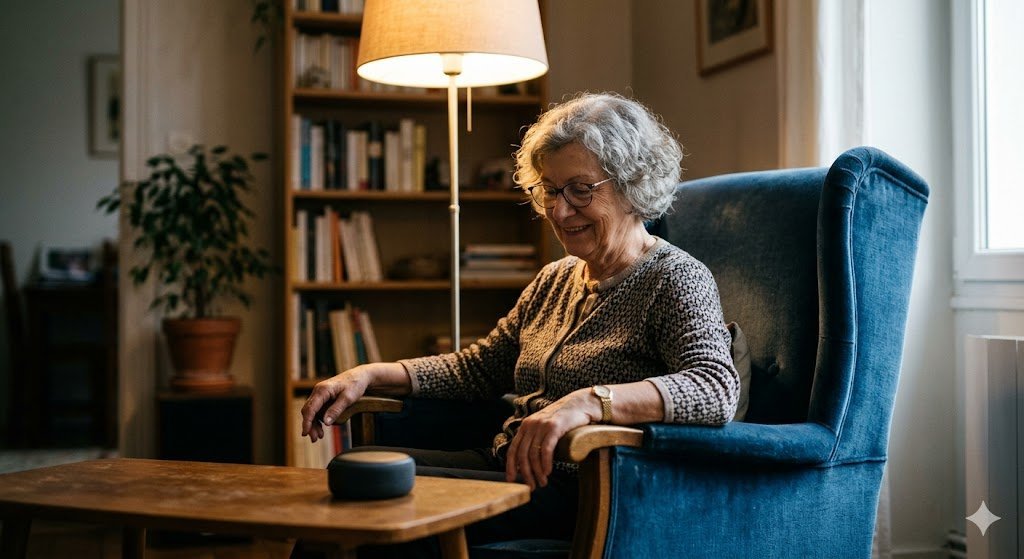
He wants tomorrow’s weather, the football score, and to hear his granddaughter’s voice — and he wants all three without finding his glasses, remembering a password, or touching a single screen. That is the whole case for voice assistants for seniors, and it is a strong one. But the best choice depends on which senior, in which house, with which habits. Here is how the main options compare when judged on the things that actually matter to an older adult living at home.
What to judge them on (it isn’t the spec sheet)
For a younger buyer, assistants differ by integrations and smart-home ecosystems. For a senior, five practical tests decide everything. Can it hear a quiet or shaky voice across a room, and be heard clearly in return? Can family set it up and fix it remotely, because the setup burden cannot land on the user? Does it make calling for help easy — a voice command to phone a daughter or, in an emergency, emergency services or a monitored contact? How forgiving is it when a command is phrased oddly, forgotten halfway, or repeated? And what does it quietly require in return — subscriptions for the features that matter, and a comfort level with a listening device in the home?
Option 1: The smart speaker (Amazon Echo and similar)
The Echo line is the default recommendation for a reason. The devices are inexpensive, the speakers are loud and clear, and the ecosystem of family-friendly features is the deepest: a relative can configure routines from their own phone, add contacts for voice calling, and set up features like drop-in for checking in. Reminders are where it earns its place in a senior’s home — medication prompts, appointment warnings, “it’s Tuesday, the bins go out” — spoken aloud at the moment they matter rather than glowing silently on a phone in another room. Weaknesses: setup and troubleshooting run through an app the senior probably does not want to manage, so a family member becomes permanent tech support; some of the most reassuring features, like certain emergency-response options, sit behind a subscription; and Alexa’s eagerness to suggest purchases and skills can confuse a user who just wanted the weather.
Option 2: The smart display (Echo Show, Google Nest Hub)
For many seniors, the screen changes everything — in both directions. A display shows the weather instead of only reciting it, puts a grandchild’s face on a video call without any menu-diving, displays the words of a song or a recipe step in large type, and confirms visually that a command was understood, which builds trust in the device faster than voice alone. Google’s Nest Hub has a gentler, less sales-driven interface and excellent photo-frame duty, which matters more than it sounds: a device that spends the day showing family photos is a device that gets kept, dusted, and used, rather than unplugged after a month. The cautions are real, too. A camera in the bedroom makes some people rightly uncomfortable (choose models with a physical shutter, and use it), and a touchscreen invites exactly the fiddly interactions voice was supposed to replace. AARP’s personal technology guides maintain useful, senior-focused walkthroughs of these devices and their privacy settings.
Option 3: The phone’s assistant (Siri, Google Assistant)
The zero-cost option is the assistant already in the phone in their pocket, and for a senior who still carries a phone reliably it is genuinely capable: calls, texts read aloud, reminders, directions. Its weakness is physical, not technical. The phone is in another room, or the battery is dead, or it is a model whose microphone struggles in a noisy kitchen. A countertop speaker hears “call Anna” from the hallway at 6 a.m.; a phone in a handbag does not. The phone assistant works best as a second layer — out of the house, in the car — alongside a fixed device at home, not instead of one.
Option 4: The old-fashioned alternative — a big-button phone and a routine
Honesty requires including the non-AI option. Some seniors will not talk to a cylinder, full stop, and for them the best technology is a simplified phone with photo speed-dial buttons, a large-print calendar on the fridge, and a family calling rhythm. Voice assistants are tools, not a test of modernity, and a solution the person actually uses beats the impressive one they unplug. Many families land on the hybrid: the assistant handles weather, music, timers, and reminders — the low-stakes joys — while anything involving help or money stays human and familiar.
The emergency question, answered carefully
For many families this is the real purchase reason, and it deserves precision. Most smart speakers cannot, by themselves, place a direct call to emergency services the way a phone can. What they can do — and what actually gets configured in most homes — is call or message named contacts by voice (“call my daughter”), which from a hallway floor after a fall is an enormous capability compared with a phone in the next room. Some ecosystems add subscription emergency-response services reachable by voice, whose operators can dispatch help to the home address. If the emergency path is the point of the purchase, test the exact chain end-to-end before relying on it: whose phone rings, what happens if they do not answer, and whether the address given to responders is the senior’s and not the family member who bought the device. Wearable alert buttons remain the more purpose-built tool for fall risk; the assistant is an excellent second layer, not a full substitute, and it should be set up as one layer of a plan rather than the whole plan.
Music, radio, and the quiet house problem
Ask seniors what they actually use these devices for after six months and the answer is rarely the futuristic stuff. It is music from their decade, radio that no longer needs a dial wrestled into tune, a timer that lets them keep cooking with floury hands, and the news read at breakfast. The deeper benefit is that a quiet house gets a voice in it that answers back — requests a song, settles a trivia argument, announces the time when asked. It is worth being honest about the limit: the assistant is company the way a radio is company, not the way a visitor is, and families do best when the device adds to human contact — the video calls, the grandchild’s photo on the screen, the reminder to phone a friend — rather than quietly replacing it. Set it up as a bridge to people and it earns its counter space. Set it up as a substitute for them and nobody will say so out loud, but everyone will know.
The setup decisions that decide success
Whichever device you choose, the first hour matters more than the brand. Place it where the senior spends the morning — audibility beats coverage. Set up voice purchasing to off, always. Add the two or three contacts they will actually call, and practice the help command together, twice, out loud, until it is muscle memory. Write the three commands they will use daily on a card kept beside the device, in large print, without embarrassment — every senior who thrives with one of these has that card. And if the whole concept still feels foreign to them, start one step earlier with how to explain AI to your elderly parents without the jargon, because a person who understands what the device is uses it with far more confidence than one who was simply handed it.
Hearing, eyesight, and hands: the accessibility fine print
Three settings separate a frustrating device from a beloved one, and all three hide in menus. For hearing: displays can show captions for the assistant’s answers, which turns a mumbled reply into readable text, and volume should be tuned to the user’s actual room rather than the showroom default — a device that cannot be heard from the bathroom is a device that fails its most important test. For eyesight: put the largest text size on from day one and choose a photo-frame idle screen over a busy dashboard of widgets. For hands and voice: commands should be short, so set up routines — one phrase like “good morning” that brings the weather, the calendar, and the radio together — instead of expecting the user to chain five separate requests. None of this appears in advertising. All of it decides, within the first week, whether the assistant becomes furniture (the good kind: used daily, unremarked) or a gadget in a drawer.
The verdict
For most families, a smart display in the kitchen is the strongest all-round choice: the screen builds trust, video calls keep grandparents in the family loop, and the voice layer handles the daily questions hands-free. Choose the plain speaker where budget rules or a screen would never be looked at, the phone assistant as the out-of-home companion, and the big-button phone without apology where voice control is a solution to a problem the person does not have. The best assistant for a senior is not the smartest one on the market. It is the one that hears their voice, answers in theirs, and is still plugged in next year.



1 Comment